
How to Install WordPress : Things to Know Before Installing WordPress
If you want to install WordPress and create your own website, Because first you need to clearly understand what WordPress is and what you can do with it.
In simple words, How to install wordpress
In addition, it is a powerful platform.. Because of this, it helps you create websites easily:
- Business websites
- WooCommerce eCommerce stores
- Blog websites
- News portals
- Portfolio websites
Because the biggest advantage of WordPress is SEO. Also WordPress websites are considered very strong for SEO. If you publish quality content, keep it readable, and follow Google guidelines, your website can rank faster.
My Experience
My name is Dharmendra Malav. I have more than 7 years of experience in the digital field However. I have worked in eCommerce and now I am a digital marketing trainer.
If you search “SEO expert Kota” or “GMB expert Kota” on Google, you will find my presence on top. This is possible because of proper SEO and consistent content.
I have trained more than 300 students, and many of them are earning well in SEO and digital marketing.
What is a Domain?
Before learning how to install WordPress, you need to understand domain and hosting.
A domain is the address of your website.
Just like you need a home address to reach someone’s house, That’s why a domain helps users reach your website.
For example
- www = World Wide Web
- dmik = your brand name
- .in = country-based domain
You can also use .com, which is globally preferred. I personally recommend using .com domain if you want worldwide reach.
What is Hosting?
Now let’s understand hosting.
Think of it like this:
- Domain = Address
- Hosting = Land (where your house is built)
Your website contains images, content, videos, and files. All these are stored on a hosting server.
Hosting makes your website live on the internet.
If you choose a good hosting provider, you get:
- Fast website speed
- Better SEO performance
- Smooth user experience
I personally use Hostinger because it provides fast servers, an easy dashboard, and affordable pricing.
Best Hosting Recommendation : How to Install WordPress
If you are a beginner, you should go with:
- cheapest WordPress hosting India → Hostinger
- beginner-friendly shared hosting
- affordable Hostinger hosting plans
When you buy a yearly plan, you usually get a free domain and better pricing.
Where to Buy Domain and Hosting?
You have two options:
Option 1 (Recommended)
Buy both domain and hosting from Hostinger
- Easy setup
- No technical work
Option 2
Buy domain from GoDaddy and hosting from Hostinger
- Requires DNS setup
- Slightly technical
How to Install WordPress (Step-by-Step)
Now let’s come to the main topic — how to install WordPress
Many beginners feel confused, but the process is actually very simple.
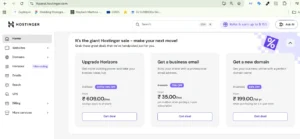
Step 1: Open Hostinger Dashboard
- Login to your Hostinger account
- Click on “Website List” from the left side
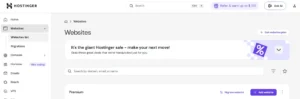
Step 2: Click on Add Website
- Click on “Add Website”
- You will see multiple options
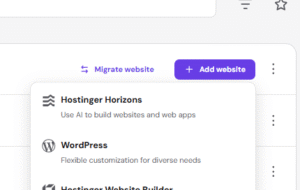
Step 3: Choose WordPress
You will see options like:
- Hostinger Website Builder
- WordPress
- PHP/HTML
👉 Select WordPress
Step 4: Set Login Details
- Choose language (English)
- Enter your email
- Create a strong password
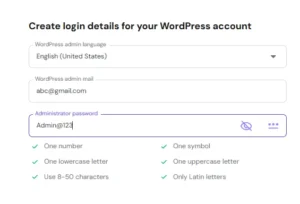
These will be your WordPress login credentials.
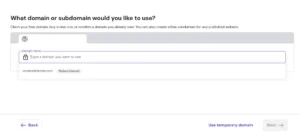
Step 5: Enter Domain Name
- Select or enter your domain
- Click next
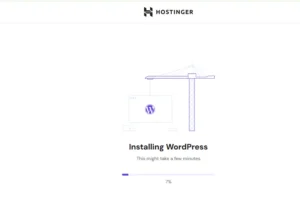
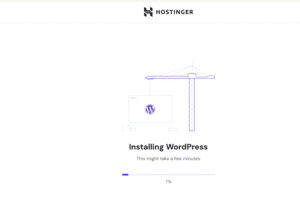
Step 6: Complete Installation
- It takes around 30sec–1 minutes So
- Click on “Go to WordPress”
That’s it. Your WordPress installation is complete.
How to Open WordPress Dashboard
Many beginners get confused here.
Just type:
👉 yourdomain.com/wp-admin
Example:
👉 dmik.in/wp-admin
- Enter your email and password
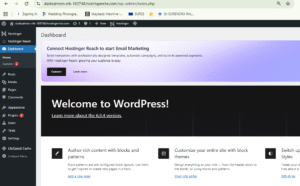
- Your WordPress dashboard will open
after login your wordpress dashboard you can see this view of page dashboard :
How to Install WordPress in cPanel
If your hosting uses cPanel, follow this method:
- Login to cPanel
- Open Softaculous Apps Installer
- Select WordPress
- Click Install
- Choose your domain
- Enter admin details
Your WordPress installation will be completed.
Important Note for GoDaddy Users
If you purchased a domain from GoDaddy:
- Go to DNS settings
- Change name servers
- Add Hostinger name servers
It usually takes 2–3 hours (maximum 24 hours) to connect.
Real Advice for Beginners How to Install WordPress
WordPress installation is not difficult.
The real challenge is:
- Consistency
- Creating quality content
- Understanding SEO
If you focus on these, your website will definitely grow.
Bonus Tip (Save Money)
Before purchasing hosting:
Search on Google → “Hostinger coupon code”
- Try different codes
- You can save up to 20–40%
Support from DMIK (Digital Marketing Institute Kota)
If you purchase hosting through our link:
- Free premium plugins
- Website setup guidance
- Full support from our team
You can contact us through dmik.in
Conclusion : How to Install WordPress
In this guide, you learned:
- What WordPress is
- What domain and hosting are
- How to install WordPress step-by-step
- WordPress installation process
If you are a beginner, WordPress is the best platform to start your online journey.
FAQs
1. How to install WordPress for beginners step by step?
To understand how to install WordPress, you first need a domain and hosting. After that, you can easily install WordPress from your hosting dashboard in just a few clicks. Most hosting providers offer one-click WordPress installation, which makes the process simple even for beginners.
2. What is the easiest way for WordPress installation?
The easiest WordPress installation method is using hosting providers like Hostinger. With their one-click installer, you can set up your website without any technical knowledge. This is why beginners prefer such platforms for quick setup.
3. How to install WordPress in cPanel manually?
To install WordPress in cPanel, you need to open the Softaculous Apps Installer. After that, select WordPress, enter your website details, choose your domain, and click on install. Within a few minutes, your WordPress installation will be completed.
4. Which is the best hosting for WordPress India for beginners?
The best hosting for WordPress India for beginners includes platforms like Hostinger. It provides fast speed, an easy dashboard, and beginner-friendly features. In addition, the pricing is affordable, which makes it a great option for new users.
5. What are Hostinger hosting plans and are they worth it?
Hostinger hosting plans are affordable and also suitable for beginners. They offer shared hosting, a free domain, and easy WordPress installation options. Because of these features, many users consider Hostinger a valuable choice.
6. What is the cheapest WordPress hosting India for beginners?
The cheapest WordPress hosting India options are usually shared hosting plans from providers like Hostinger. These plans are budget-friendly and easy to use. Therefore, they are ideal for beginners who want to start with low investment.
7. Do I need coding knowledge for WordPress installation?
No, you do not need coding skills for WordPress installation. Most hosting companies provide one-click installation tools. So, even without technical knowledge, you can set up your website easily.
8. How long does it take to install WordPress on hosting?
WordPress installation usually takes around 2–5 minutes when done through hosting dashboards like Hostinger or cPanel. However, the exact time may vary depending on the server speed.
9. Can I install WordPress without cPanel?
Yes, you can install WordPress without cPanel. Many hosting providers, like Hostinger, offer their own custom dashboards such as hPanel. This makes the installation process even simpler and more beginner-friendly.
10. Which hosting is best for WordPress hosting cheap and fast?
If you are looking for WordPress hosting cheap and fast, Hostinger is one of the best options. It provides good speed, affordable pricing, and reliable performance. That’s why it is widely recommended for beginners.